
How to Connect Your CEIVA Frame
One of the most revolutionary features of PicturePlan® Photo Delivery Service is your CEIVA's ability to connect automatically to retrieve photos. Once you set up your first connection, new photos you've been sent will appear on your frame — you don't have to do a thing!
First Time Connection Instructions

Step 1. Register Your CEIVA
To register your new frame youâll need a CEIVA account. If you already have an account, sign in here or please visit: www.ceiva.com/gettingstarted to create a new account. If you'd like us to register your new frame for you, simply call us toll-free at 1-877-692-3482. You will need to know your CEIVA's 12-digit serial number which is printed on the box and on the back of your frame.
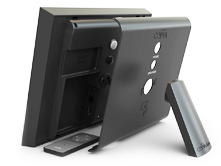
Step 2. Set Up Your Frame
Wi-Fi: Remove the back cover of your new CEIVA and plug in the power adapter. Replace the back cover and lock it into position with the stand. Plug the power adapter into an outlet and you'll be greeted with our welcome pictures.
Ethernet (Wired Internet): While the back is removed from your frame, plug the optional CEIVA Broadband Adapter into C-Port and connect it to your router with an Ethernet cable. (Not Included.)
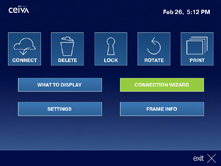
Step 3. Getting Connected
Almost done! Press the ‘Menu’ button on your remote. Highlight ‘Connection Wizard’ in your frame's menu and push the ‘Select’ button to be guided through setup. Be sure to have your Wi-Fi password on hand if you’re planning on connecting wirelessly. At the end, select ‘Get Pictures Now’ and your CEIVA will be ready to receive photos.
That's it! For more assistance with any of these steps, search our Customer Care questions or call our U.S.-based Customer Care Team toll-free at 1-877-692-3482. Be sure to upload photos and invite guests in your CEIVA account to start getting photos on your frame. And take a look at our Photo Plugins and Software for information about photo sending options from Adobe, Facebook, Picasa, iPhoto, camera phones and more!
Contact Us
CEIVA Logic Inc.
214 E. Magnolia Blvd.Burbank, CA 91502
Customer Care Hours
Monday-Friday8:00 am - 4:30 pm PT